We are excited to introduce the Control Group (Holdout) feature, a new option available for all orders that helps you measure the effectiveness of your campaigns.
What is a Control Group?
A control group is a randomly selected portion of your audience that you intentionally "hold out" from receiving a mailing. By comparing the behavior of this untreated group to the group that received the mail (the "treated" group), you can accurately measure your campaign's impact.
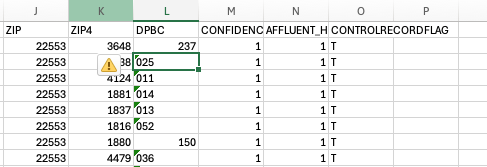
When you enable this feature, the system adds a Control Record Flag to your output file, so you can easily identify which recipients were in the control group.
Key Features and Benefits
-
Isolate a Test Group: Designate a portion of your audience for holdout testing and analysis.
-
Flexible Sizing: Set the size of your control group to any percentage from 0% to 100%, depending on your needs.
-
Balanced Selection: The system uses proportional random selection across all parts of your order to ensure the control group is a balanced and representative sample.
-
Clear Identification: Quickly distinguish control records from treated records using the flag in your output file.
How to Enable the Control Group Feature
You can opt-in to use a control group on any order during the setup process.
-
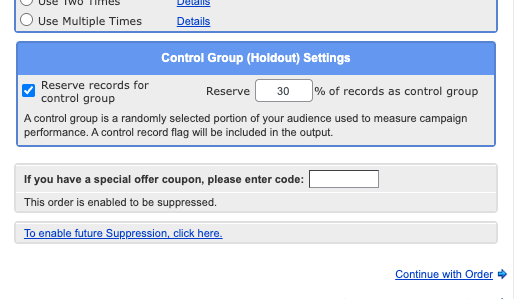
In the order setup screen, locate and check the box for "Reserve records for control group".
-
Enter the percentage of your audience you wish to reserve as the control group.
-
Complete your order as usual.
The output of this feature will add a "CONTROLRECORDFLAG" to your list that includes a "T" or a "C".
Carly Brown
Comments